What Growing Businesses Learn When Microsoft Security Comes Before AI
Most growing businesses do not have an AI problem. They have an AI readiness problem.

Employees are already using AI to find information, analyze data, automate work, and make faster decisions. Microsoft 365 Copilot and the first wave of AI agents are extending those capabilities into the Microsoft environments these organizations already run on.

The tools are not the hard part. The hard part is knowing what happens when AI is pointed at years of accumulated business data, and whether the answer is one leadership can live with.

That is a security question before it is an AI question.

The Real Reason AI Projects Stall

Plenty of AI initiatives die quietly. Not because the technology failed, but because no one could answer a simple question from finance, legal, or the board: what will this thing actually be able to see?

It is a fair question, and it stops projects. The organizations that clear it quickly are rarely the ones with the biggest security budget. They are the ones who did a specific piece of work in a specific order beforehand, so the approval conversation shifts from proving something is safe to demonstrating it is already controlled.

The order matters more than most people expect.

Information Behaves Differently Once AI Can Reach It

AI makes organizational information dramatically more useful. Employees surface knowledge faster, analyze across sources, and summarize complex material in seconds.

That same capability makes years of accumulated permissions, legacy collaboration sites, and quietly connected applications visible in ways they never were before. What an assistant can reach on day one was decided long ago, by decisions no one remembers making.

There is a meaningful difference between environments where this is discovered before deployment and environments where it is discovered after. The gap is usually not technical sophistication. It is sequence.

Most of the Foundation Is Already Paid For

For organizations already in the Microsoft ecosystem, much of the security foundation is already licensed and available.

Entra, Defender, Intune, Purview, and Sentinel span identity, data, devices, applications, threat protection, governance, and security operations. Growing organizations often have capabilities available to them that are not fully configured or utilized.

Which pieces to activate, and in what sequence, is where the actual expertise lives. Turning everything on at once creates noise, friction, and a help desk problem. Turning on the right things in the right order tends to produce more measurable risk reduction than the next product purchase would.

Visibility Changes How Money Gets Spent

Without a clear picture of the environment, security spending becomes reactive. Every headline, vendor pitch, and client security questionnaire creates pressure to buy something.

With that picture, leaders can rank exposures against real business impact and fund the ones that matter. The conversation stops being about threats in the abstract and starts being about this organization, this data, these users.

That shift is usually worth more than any single control.

What Comes After Copilot

The next phase of AI extends well past assistants. Agents will act on information, applications, and workflows on behalf of the business.

That raises the stakes on visibility, accountability, and governance considerably. The organizations positioned to move quickly on agents will be the ones that sorted out identity and data controls during the Copilot phase, largely because the groundwork does not need to be laid twice.

The window to do that work quietly, before it becomes urgent, is open right now.

Where This Starts

Confident AI adoption starts with understanding the Microsoft environment AI will inherit.

The DStrategyTech Microsoft 365 + AI Security Assessment gives business and technology leaders a clear view of their current security posture, priority areas of risk, and a practical path toward secure AI adoption.

The outcome isn’t more security technology. It’s the confidence to move forward with AI.
Talk to DStrategyTech →

Cybersecurity and Data Audit: Protecting the Data AI Can Reach

AI adoption is changing a fundamental cybersecurity question. It is no longer enough to ask who can access your business data. Organizations also need to ask:

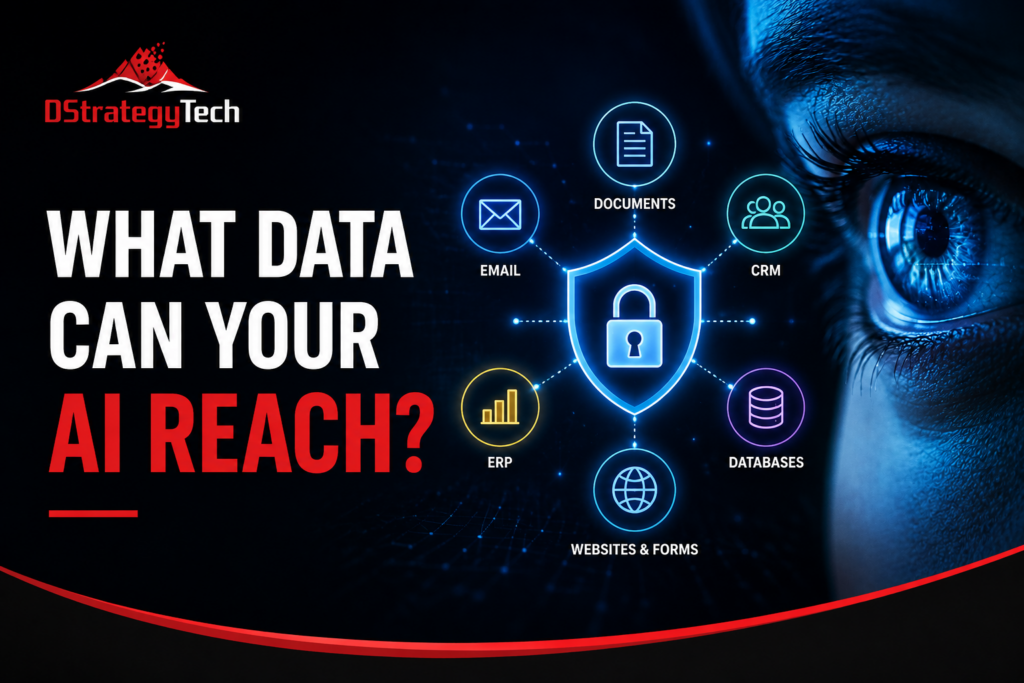
What data can our AI tools reach?

For small and mid-sized businesses, that data may be spread across Microsoft 365, Dynamics 365, ERP and CRM platforms, websites, databases, cloud storage, email, documents, and third-party applications.

As AI becomes connected to these systems, understanding its reach should become part of the organization’s cybersecurity and data audit.

Start With the Data, Not the AI Tool

Before evaluating AI security, identify where important business data resides.

For a Microsoft-centered organization, this could include:

  • Microsoft 365: Outlook email, Teams conversations, SharePoint sites and OneDrive files
  • Dynamics 365 CRM: customers, contacts, opportunities, activities and sales history
  • ERP systems: financial records, vendors, purchasing, inventory, orders and employee-related information
  • Websites: contact forms, customer inquiries, analytics and uploaded information
  • Databases and data platforms: SQL databases, Microsoft Fabric, Power BI datasets and data warehouses
  • Other SaaS applications: ticketing, HR, marketing, accounting and industry-specific platforms

The objective is not simply to create another inventory. It is to understand which systems contain sensitive or business-critical information and how AI could interact with them.

One distinction matters here. Data held in an on-premises ERP environment, such as Dynamics NAV or AX, may sit outside the organization’s primary Microsoft 365 governance boundary. Before exposing that data to AI, organizations should understand how identity, classification, access controls and monitoring extend to those systems.

Map What AI Can Reach

An AI assistant may appear to be a simple chat interface while operating through connectors, APIs, plugins, agents, identities and user permissions.

For example, an AI system connected to Microsoft 365 could potentially retrieve documents from SharePoint or OneDrive. An agent connected to Dynamics 365 could interact with customer records. An AI workflow connected to an ERP system could potentially process financial or operational information.

That creates an important audit question:

Does the AI have access only to the information required for its business purpose, or can it reach significantly more?

Organizations should map each AI tool or agent to the systems, identities, connectors and data sources it can access.

Identity, Permissions, Data, AI Access

AI can amplify weaknesses that already exist.

A SharePoint site with overly broad permissions, an old user account with unnecessary access, or an ERP integration using excessive privileges may become more significant when AI can discover and process information across systems quickly.

A cybersecurity and data audit should therefore follow that sequence in order: identity, then permissions, then data, then AI access. Each layer determines what the next one can reach.

Look for excessive privileges, stale accounts, unnecessary connectors, public links, sensitive information in inappropriate locations, and AI applications with broader access than their purpose requires.

Protect, Monitor and Reassess

The audit should not end when an AI application is deployed.

Organizations should monitor authentication, connector activity, unusual data access, permission changes and sensitive-data interactions. Existing capabilities such as Microsoft Entra ID, Purview, Defender, audit logs and data-loss-prevention controls can contribute to that visibility.

The environment should also be reassessed when a new AI agent, connector, data source or business process is introduced.

The Bottom Line

AI does not eliminate traditional cybersecurity and data-governance principles. It makes understanding data access more important.

For small and mid-sized businesses, the starting point can be straightforward: know where your important data lives, understand what your AI can reach, restrict access to what it actually needs, and monitor that access over time.

The reach your AI tools have today is determined by the identities, permissions, connectors and systems behind them. Understanding that reach is where the work begins.

Next Step

A cybersecurity and data assessment identifies where sensitive information resides across your systems, what your current AI tools and connectors can access, and which controls to establish before AI usage expands further.

Contact DStrategyTech to discuss your environment.

AI Readiness for SMBs: What to Evaluate Before Buying an AI Tool

Most small and mid-sized businesses begin their AI discussion with a product. A team sees a competitor announce something, or a vendor demonstrates a capability, and the conversation moves quickly to which tool to purchase.

This is a reasonable starting point. It is also where many organizations spend budget without seeing a return, because the tool is rarely the constraint.

A more reliable principle applies:

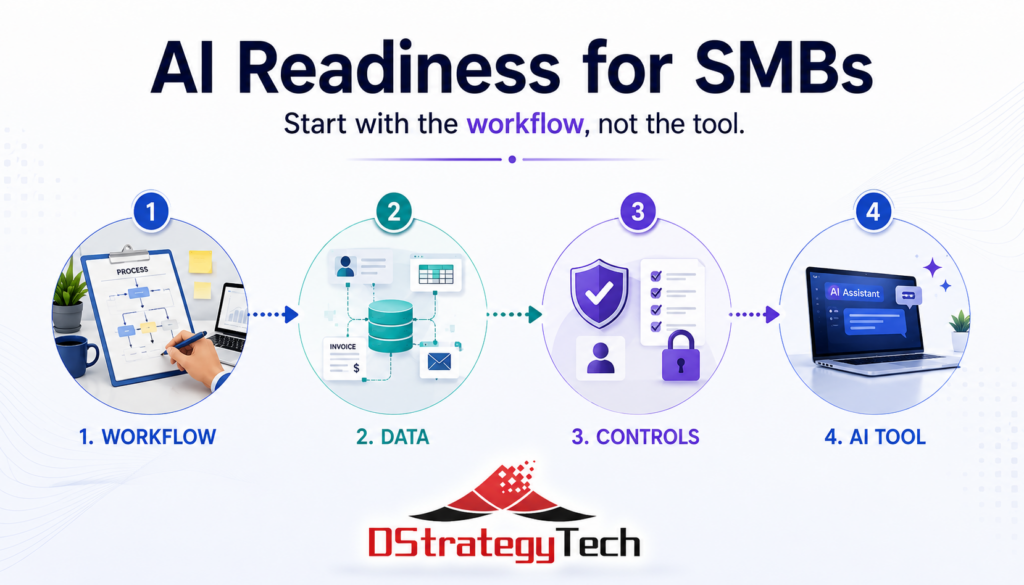
Start with the workflow, not the tool.

Before selecting a platform, three areas are worth evaluating. They cost nothing to assess and generally take an afternoon.

Where AI Adoption Usually Stalls

Across SMB implementations, the same pattern appears. The technology works as described. The business outcome does not materialize.

Common reasons include:

  • the process being automated was never clearly defined
  • information required by the tool sits across disconnected systems
  • output is not reviewed before it reaches customers
  • no baseline exists, so improvement cannot be measured

These are not technology problems. They are readiness problems, and they surface after purchase rather than before.

1. Defining the Work

Effective adoption begins with a specific task, not a general objective.

“We want to improve efficiency” cannot be evaluated. “Our office manager spends six hours each week entering supplier invoices into the accounting system” can be.

The distinction matters more with AI than with previous software categories. A scheduling system imposes structure on a process. An AI system inherits whatever structure already exists. When a process is undefined, the output is fluent, professional, and inconsistent, which takes longer to detect than an obvious error.

Organizations that see measurable results generally complete three steps first:

  • select one task
  • document how it currently works
  • record how long it takes and what it costs

This becomes the baseline for evaluating whether anything improved.

2. Assessing Information Readiness

AI produces results based on the information available to it. When that information is fragmented, the output reflects the fragmentation.

Most SMBs do not need enterprise data infrastructure. They do need clear answers to a few questions:

  • where does core business information reside, including customers, jobs, invoices, and inventory
  • is that information current, or does the accurate version exist elsewhere
  • where is the same information entered manually into more than one system
  • which information is sensitive, regulated, or inappropriate for use with external AI tools

The third question is the most useful. Manual re-entry indicates that two systems are not connected and a person is compensating for the gap. Those points are usually the strongest candidates for automation.

Mapping five core processes and marking each re-entry point produces a practical shortlist without any purchase decision.

For organizations already using Microsoft Dynamics 365 Business Central, much of this structure exists. The evaluation then focuses on where data remains outside the system.

3. Establishing Review and Usage Controls

As AI output moves closer to customers and financial decisions, review becomes necessary.

Two controls address most of the risk:

Human review before release. Any AI-generated customer communication, quote, or summary should be reviewed by a person before it leaves the business. Larger organizations have layers of review that catch errors. Smaller organizations generally do not.

A defined usage policy. Staff need clear guidance on which tools are approved and what information may be entered into them. Customer records, contracts, payroll data, and other sensitive information entered into unapproved AI tools can create privacy, security, and compliance risks the business may not recognize.

A single page covering approved tools, restricted data, and review responsibilities is sufficient for most SMBs at this stage.

Microsoft provides guidance on data protection and governance through Microsoft Purview for organizations operating within the Microsoft ecosystem.

Where the Tool Decision Fits

Once these three areas are assessed, platform selection becomes straightforward.

For most small and mid-sized businesses, the AI capabilities included in existing software will address a meaningful portion of the opportunity. This is generally worth exhausting before adding new tools. A general-purpose assistant for a small group of interested users is inexpensive and produces better information about what is practical than a vendor demonstration.

Custom-built systems have a place. They are rarely the appropriate starting point.

From Self-Assessment to Formal Review

The three checks above provide a practical starting point that any business can complete internally.

A formal readiness assessment goes further, evaluating five dimensions of the organization:

  • strategy and leadership alignment
  • data and systems
  • people and skills
  • process and operations
  • governance, risk, and controls

The output is a current-state view and a sequenced set of next steps. It is platform-neutral by design, since the objective is to establish direction before committing to a technology.

About DStrategyTech

DStrategyTech is a Michigan-based Microsoft Partner working with small and mid-sized businesses on data, automation, and AI adoption. The approach focuses on establishing structure and visibility before introducing new technology.

We also publish Enterprise AI Digest, a weekly summary of developments across the enterprise AI landscape.

Bottom Line

AI adoption in SMBs is less constrained by technology than by preparation.

Organizations that see results generally follow the same sequence:

  • define one process clearly
  • organize the information that process depends on
  • establish review before output reaches customers
  • measure the result, then repeat

Start with the workflow, not the tool. This approach takes longer to begin and considerably less time to produce an outcome.

Next Step

An AI readiness assessment identifies which processes are worth automating, where data and integration gaps need attention, and which controls to establish before selecting a platform.

Contact DStrategyTech to discuss your current state and priorities.